Start with the controls you reach for most. Stream Deck+ suits a layout you want to change between aircraft or other desktop tasks. Logitech's Multi Panel gives you a dedicated autopilot unit, but its support page lists older Windows versions, so check the current driver information before buying for a newer system.
Which panel fits your setup?
| Device | Physical controls | Software path | Consider it when |
|---|---|---|---|
| Elgato Stream Deck+ | Eight customizable LCD keys, four dials, and a touch strip. | Elgato supports keyboard shortcuts and plug-ins. Direct sim actions depend on the integration you choose. | You want a configurable layout for controls and desktop shortcuts. |
| Elgato Stream Deck MK.2 | Fifteen customizable LCD keys; no physical dials. | Use Stream Deck software with hotkeys or compatible plug-ins. | Your priority is button commands rather than rotary controls. |
| Logitech Flight Multi Panel | Dedicated autopilot controls with a real-time LED display, plus controls for flaps and pitch trim. | Logitech says a support plug-in adds compatibility with PC flight simulators, including Microsoft Flight Simulator. | You prefer a fixed flight-sim panel over a customizable key layout. |
Buying through our Amazon links costs you nothing extra and helps keep MSFS Setup free. As an Amazon Associate we earn from qualifying purchases.
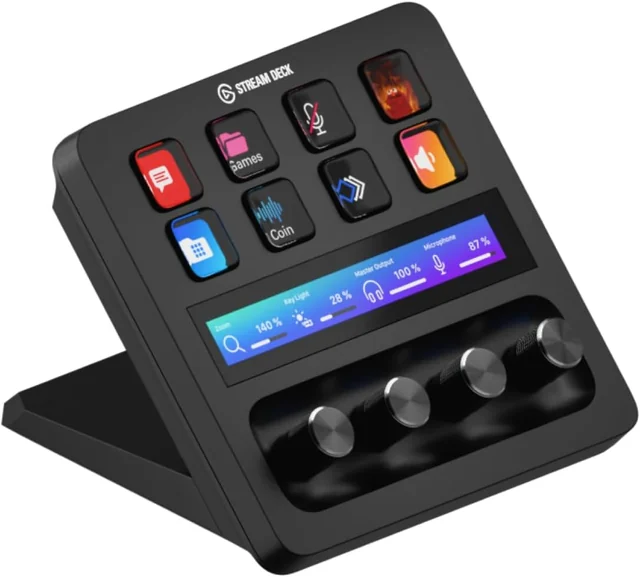
Elgato Stream Deck+
Programmable keys and dials for shortcuts or supported plug-ins. Choose it when you want to decide what each control does.
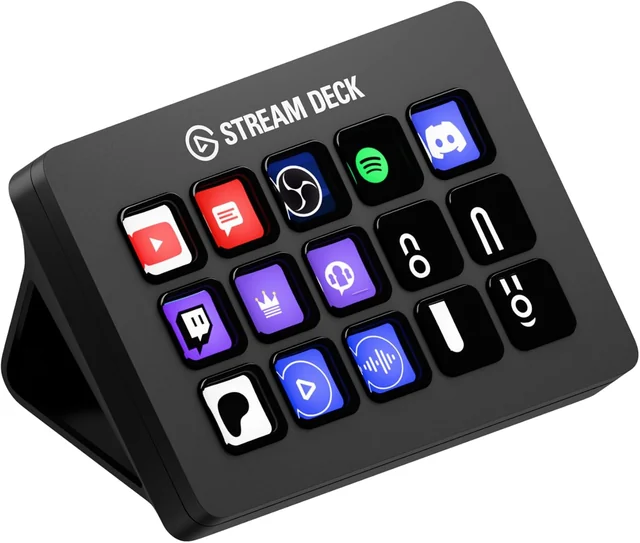
Elgato Stream Deck MK.2
Fifteen LCD keys for commands and shortcuts. It has no rotary dials, so choose it when keys cover your needs.
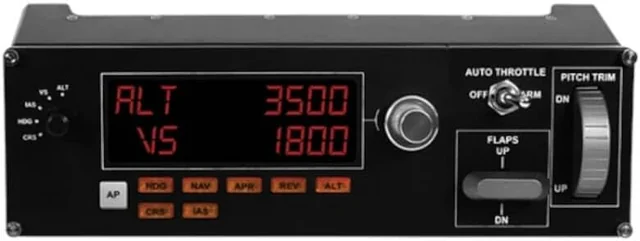
Logitech Flight Multi Panel
Fixed autopilot controls with a display, plus physical flap and pitch-trim controls. Check current Logitech software support for your Windows version.
Set up controls you can reach in the sim
- Choose the commands first. Write down the autopilot or cockpit actions you want to use without a mouse.
- Install the matching software. Logitech documents a support plug-in for its panel. Stream Deck can send keyboard shortcuts or use a plug-in; check that your chosen integration supports the MSFS functions you need.
- Bind and check one control at a time. In MSFS Settings, open Controls and select the connected device. Use Search by Input to find duplicate assignments, then verify each command in the aircraft you fly.
- Save a profile for that aircraft or category. MSFS supports general, aircraft-category, and aircraft-specific profiles. Keep different layouts separate when the controls change by aircraft.
Logitech's current Flight Multi Panel page lists Windows 7, 8.1, and 10 and names Microsoft Flight Simulator as a supported PC sim through its plug-in. It does not identify MSFS 2024 separately. Confirm current support for your system before choosing it. Elgato's Stream Deck+ page and Stream Deck page describe keys, dials, shortcuts, and plug-ins.
The full Honeycomb Bravo also includes an autopilot panel. If you own one, see our Bravo setup guide before adding a second panel. The MSFS controller checklist covers profile setup and binding conflicts. Airbus throttle detents are covered in the TCA Airbus quadrant guide.
Autopilot panel questions
Can Elgato Stream Deck+ control MSFS without a plugin?
It can send keyboard shortcuts through Stream Deck software. Direct simulator actions depend on a plugin or other integration that supports the function. Elgato documents both hotkeys and plugins as control paths.
Does Logitech Flight Multi Panel work with MSFS 2024?
Logitech's product page names Microsoft Flight Simulator for PC with its support plug-in, but it does not identify MSFS 2024 separately. The page lists Windows 7, 8.1, and 10, so check current Logitech support if you use a newer Windows version.